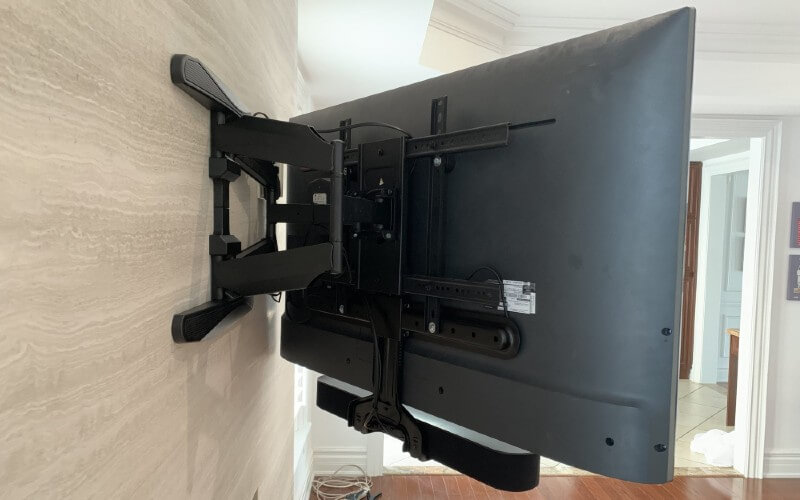
Nowadays, soundbars have become an important part of a home theater. A soundbar is very useful for a home theater. They also have a nice and stylish looking. They make your home theater very attractive. If you have a home theater and want to mount it to your TV, how will you do that? Then you need to follow these processes:
Buy a bracket to put the soundbar on your TV. If your TV is mounted on the wall, move it off of the wall. Remove the TV mount and eyeball where you want to attach the brackets. Then attach them and put your soundbar in place. Make sure that it is going to fit with the brackets and then re-mount your TV. Attach your soundbar to its bracket.
These processes aren’t too difficult to do. If you properly do these processes from the beginning to finishing, you will mount the soundbar to your TV successfully. Now, we will describe these processes in detail.
Purchase a Universal Soundbar-to-TV Bracket
The first process of mounting a soundbar to a TV is to purchase a universal soundbar to a TV bracket. You can purchase it from Amazon or any electronics store. There are many soundbar-to-TV brackets on the market, but we recommend the Mounting Dream Soundbar Mount (on Amazon).
This will work perfectly with most of the soundbars, while others may not work perfectly. Other soundbar-to-TV brackets are also overpriced. If you are going to mount your TV to the wall, it is important to have the soundbar mounted.
If Mounted, Remove your TV From the Wall
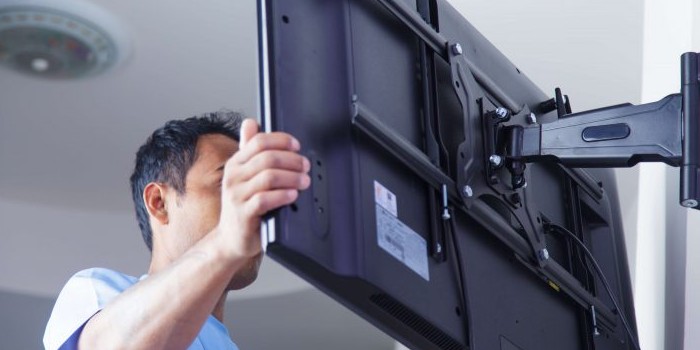
The second process of mounting the soundbar to your TV is to unmount your mounted TV from the wall. It may take a little bit of time, but you have to do it properly without creating any mess.
If your TV isn’t mounted, then you can avoid this step. It would be better to go to the next step. If you have a new TV that is unmounted, then you have to mount it to the wall, and you need the wall-mounting bracket set up. Cause the wall mount placement depends on the soundbar mounting bracket placement.
Remove TV Mount and Eyeball the Bracket Placement
Your TV may already have a wall mounting bracket. It is an important step. The wall mounting bracket and the soundbar mounting bracket will need to use the same holes. In that case, you will need to find out how these brackets will lay together.
This won’t be a difficult task to do. First, you will need to lay the TV flat then place the TV wall mount on top of the TV. You need to make sure the place where you mount the TV on the wall has been properly mounted on the wall. If you haven’t done the test of the wall mount on the wall, then do it first. By testing, you will be able to know the proper holes to use on your TV mount.
After that, you will need to lay the soundbar bracket on the peak of the wall mounting bracket to visually determine where the soundbar needs to hang, depending on which holes on the soundbar bracket you will be using. For that, you will need the soundbar nearby. If you have a marker, then mark them. You need to leave enough space between the top of the soundbar and the bottom of the TV for the top of the unit buttons.
Connect the Wall Mount and Soundbar Bracket to the TV
If you have abided by the previous step properly, this step will be an easy one for you. To attach the soundbar bracket and the Mount, you will have to use the marked holes to make sure everything is in the right place. To secure them, you need to use the hardware that came with your bracket and Mount.
You might need to buy long screws from the hardware store if the original screws are not long enough. When you are going to use one bold threaded through the wall mount and the soundbar bracket, you might need longer screws for that. If you don’t prepare yourself with the long screws, then you might fall into a mess; it will kill your lots of time.
Check that the Soundbar Will Fit the Bracket, and that Re-Mount the TV
If you have done all of the previous steps properly, then you need to check that the soundbar will fit the bracket. If it fits, then you can go forward and re-mount the TV on the wall. Still, you don’t need to attach the soundbar at this moment. Cause if you attached the soundbar with the TV while you are re-mounting the TV, it can’t prevent any extra weight. So, while re-mounting the TV, you should not attach the soundbar with the TV.
Attach the Soundbar and Test
Now, it is time to attach your soundbar to the bracket. For that, you need to use the hardware that came with the bracket in order to fix the soundbar in place. If you want to test the unit, then you need to connect to the TV or media device through Optical, RCA, HDMI/HCMI, or Bluetooth.
We have told you earlier that you need to leave enough space between the top of the soundbar and the bottom of the TV for the top of the unit buttons. If you don’t leave enough space, you may need to take off the TV to change up the mounting bracket position.
Should You Mount a Soundbar to TV?
Now, let’s discuss the details of how both mounting and not mounting your soundbar to your TV can change your experience.
Mounting a Soundbar By Itself
If your TV and soundbar are mounted separately, your front speakers’ sound, which your soundbar always provides, will not move while you move your TV. If you have a big room, you should have your TV on a knotting mount so you will be able to turn it in different directions. If your TV is on a permanent mount, you can easily follow this step.
Mounting a Soundbar to a TV
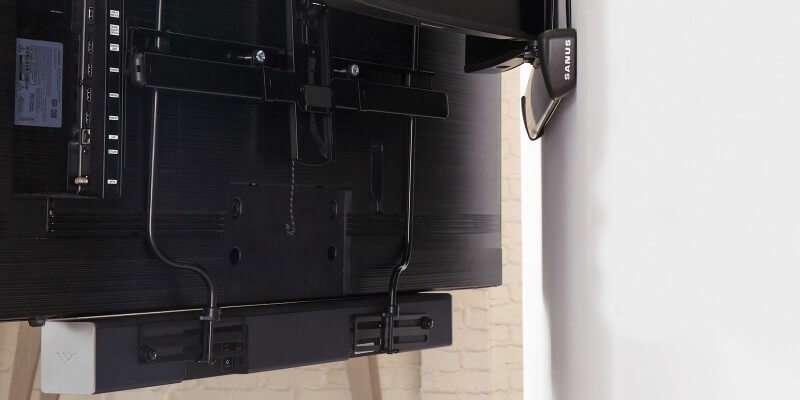
You will find a lot of advantages when you mount your TV to your soundbar. One of them is the sound moves with the TV. If you move your TV in another direction, the sound will move with the TV, and the sound will be directed at the person who is watching the TV.
A mounted soundbar will give your home theater the next level of sound. It will increase sound quality, and you would love the quality of a mounted soundbar.
Not Mounting Your Soundbar
If you don’t mount your soundbar, it can be damaged by the children or pets(if you have), it can be dirty by dust, etc. If you mount your soundbar to your TV, you can avoid these kinds of problems. It will also give your home theater a great look.
But it all depends on your TV and your room size. If you don’t have any extra space, you won’t be able to mount your soundbar to your TV. If you have enough space to do that, then it will be better to mount your soundbar. If you feel sluggish to do so, then wake up from sluggishness and make your home theater tidier.
Recommended Soundbar to TV Mount
There are many soundbar-to-TV mount options in the market, so it isn’t easy to choose one. You always want to buy the best product for yourself. You always want to find out high-quality products. Cause high-quality products will last long.
Though there are many soundbar-to-TV mounts, we have already recommended the Mounting Dream Soundbar Mount (on Amazon). If you don’t like this one, you can also go for the Mount-It! Universal Soundbar Mount (also on Amazon). The Mount-It! Universal Soundbar Mount is a great soundbar-to-TV mount. It comes with a great price and a high-quality performance. You can see the review of this product. It has many positive reviews. So, you can rely on this product.
If you have a large home theater and 32-70 inches TV, it will easily fit your home theater and make your home theater tidier. The Mount-It! Universal Soundbar Mount also fits renowned brands like Sonos, Sony, Vizio, and Samsung. It connects with fixed, tilt, full-motion, articulating, and interactive TV wall mounts.
It is made with 2.5 mm thick high-strength steel, which can hold up to 33+ lbs. Though the Mount-It! Universal Soundbar Mount comes with many great features; you need to consume a decent amount of money to purchase it.
Brand-Specific Options
If you want a soundbar-to-TV mount suitable for your soundbar, you don’t need to worry because there are many options out there for you. Suppose, if you have the SONOS Beam, then you can go for the Sanus Soundbar Mount (on Amazon). It is also capable of working with any TV mount.
If you don’t want to mount your TV and soundbar together, then there are also many options out there for you. There are soundbar-to-TV mounts that are designed for tangible soundbars – for example, the Bose Soundbar Wall Mount Bracket by Dinghosenn (also on Amazon).
Tips for Optimized TV Mounting
While mounting, you always need to keep in mind that eye level is favorable for your TV screen in your home theater. To avoid eye and neck strain, you need to follow these below processes while mounting:
- In order to avoid neck strain, you always need to ensure that your seats are a nice distance away from your mounted TV.
- Choose an amount that can be cant downward if you want to mount your TV much higher than eye level.
- Choose a position by starting at the lowest height if possible, but if you want to mount it higher, then test it out in small enhancements.
- There are high-quality mounts that are flexible and well-priced. You can move them freely. You can check out the ECHOGEAR Full Motion Articulating TV Wall Mount (on Amazon).
We wish you a happy mounting!
-our editorial board has reviewed this article and has been approved for publication according to our editorial policy.
Best Seller List of Soundbar Mounts:
You May Also Like…
- What’s the Difference Between 2.1 and 3.1 Soundbar?
- How to Setup Logitech Harmony Hub?
- What is 4K Soundbar?
- Sonos Playbar vs. Bose SoundTouch 300
- How To Use Bluetooth Speaker With Amazon Fire Stick?
Last update on 2026-11-05