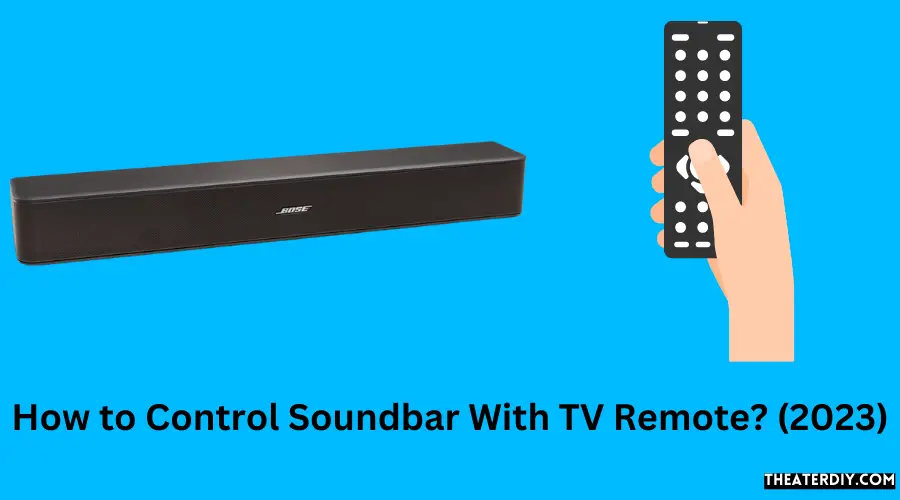
How to Control Soundbar With TV Remote? (2023)

To Control the Soundbar with the TV Remote, go to Settings → Sound Output. Next, select your soundbar and then close the Settings. You should be able to use the TV remote to change the volume and mute it. The soundbar should also turn on and off.

TV Remote Soundbar Mastery

If you are a new soundbar user and you are finding a way to make the controlling simpler of your TV and soundbar, then there is good news for you. You will be able to control both your TV and soundbar with just one remote. It is a good way to avoid dealing with many remotes and simplify your whole entertainment system.

OR, If you want to control your soundbar with your TV remote, then you just have to follow these steps:-

  1. Look for the ARC connection port on your TV and soundbar.
  2. Connect the HDMI or optical cable to each
  3. Start the TV & soundbar
  4. Troubleshoot and Test Any Connection Problems
  5. Adjust and optimize your sound to improve it.

The process of connecting and controlling your soundbar with your TV remote mostly depends on the brand of your TV. You have to follow different ways to connect your soundbar for different TV brands. In this article, you will get to know that what you have to do to command a soundbar with your TV remote.

Find the Optical or HDMI ARC Connection on both the Soundbar and TV
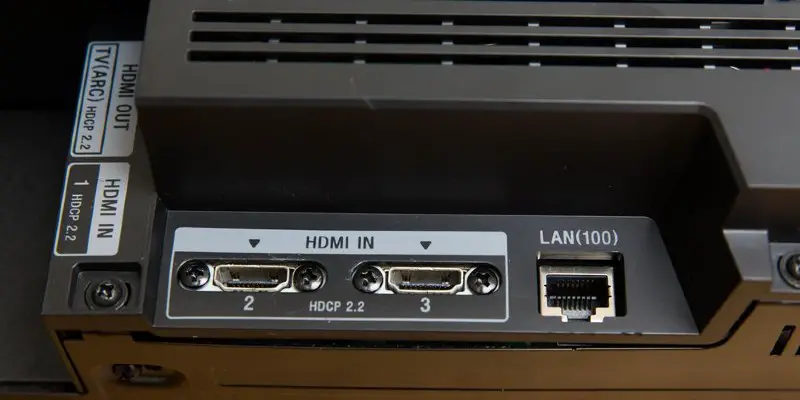
HDMI ARC

Firstly you have to check out your TV and soundbar to see the type of inputs you have available. The best way to connect is HDMI ARC. Now many TVs and soundbars come with this feature. If you don’t have HDMI ARC available, then you can look for a digital optical cable connection. It is really a good option.

If your TV and soundbar have both possibilities, you may be confused about which one you should use. You do not have to consider much you can use any of them. After you decide which one you are going to use, you just have to follow the instructions below. 

If you will connect your TV and soundbar via HDMI ARC, you have to connect your soundbar’s ‘HDMI OUT’ or ‘HDMI OUT’ to the ‘HDMI IN (ARC)’ on your TV.

Again if you want to connect your TV and soundbar by Using a Digital Fiber Optical Cable, or you can call it just optical cable. Then you have to find out the ‘DIGITAL AUDIO OUT (OPTICAL)’ or ‘DIGITAL OPTICAL OUT’ on your Television and also the ‘DIGITAL AUDIO IN (OPTICAL)’ or ‘OPTICAL IN’ on your soundbar.

Connect an Optical or HDMI Cable to Each Device

Whether you are using HDMI ARC or an optical connection, you might need the right cables. The soundbar manufacturer might provide you with the correct cable. You just have to plug those cables in the right port.

And if you have an old HDMI Arc cable and a question had come to your mind, can you use the cable? And the answer is yes. Any HDMI cable with the 2.0 standard or more upgraded will work well. But some options on Amazon reassuringly call out the ARC capability right in the listing, like the AmazonBasics Premium HDMI Cable (on Amazon).

Amazon Basics Flexible and Durable Premium HDMI Cable (18Gpbs, 4K/60Hz) - 10 Feet, Black
  • IN THE BOX: 10-foot flexible, lightweight HDMI cable; black
  • CONVENIENT: Ideal for connecting media devices to playback display such as HDTVs, projectors, and more
  • DEVICE COMPATIBILITY: Blu-Ray players, computers, Apple TV, Roku, cable, PS4, Xbox One, and other HDMI-compatible devices
  • SUPPORTS: Ethernet, 3D, 4K HDR and ARC (4K@60Hz, 18Gbps)
  • DURABLE DESIGN: Solid copper conductors and full metal jacket shielding for strength and high-performance connectivity

When you use an optical cable, you have to make sure that the small plastic caps on the ends are taken off. Then you have to keep pushing each side into the TV and soundbar tightly till you hear or feel a click. But do not have any optical cable, or if the fiber optics in your cable have been damaged, you can easily get a cable like the iVANKY Optical Cable Digital Audio Cable for Home Theater for a reasonable price.

IVANKY Digital Optical Audio Cable 6ft/1.8M, Slim Nylon Braided Audio Optical Cord Toslink Cable for...
  • 【Unparalleled Sound Quality】iVANKY digital optical audio cable adopts Japan Toray Original Fiber Core for zero distortion Lossless Audio. This Toslink cable compatible with uncompressed PCM audio and compressed 5.1 to 7.1 surround sound systems including Dolby Digital Plus, DTS-HD High Resolution and LPCM, delivering stunning sound with wide dynamic range to your living room
  • 【For Immersive Sound Experience】iVANKY optical audio cable allows you to connect soundbars and home theatres to TVs/PS4/Xbox/Blu-Ray Players, and more devices with standard Toslink (s/PDIF, Optical) ports.Spatial audio places sounds all around you to create a three-dimensional listening experience for music, TV shows, movies, and more
  • 【Ultra Durability】Unlike conventional PVC jackets, the optical cord for soundbar with quality nylon braided jacket withstands over 15,000 bends, not easily broken anymore. Aluminum shell and gold-plated connector won't tarnish and decrease conductivity over time
  • 【Considerate Design】Precisely designed cuboid connectors make this digital audio optical cable easier to identify the installation angle and fits snugly. Carefully-chosen nylon material is flexible and lightweight, CL3-rated. Removable rubber caps can prevent dust and oxidation when not plugged in
  • 【iVANKY's Customer Support】You'll receive a digital optical audio cable, along with an 18+36-month customer support and our friendly support team ready to help within 24 hours. Each iVANKY cable undergoes rigorous quality control to ensure optimal functionality. We go beyond selling cables by providing expert technical support to every customer

Turn the TV and Soundbar On

After connecting your soundbar with your TV via an HDMI ARC or optical connection, you have to turn them on. You can turn on your devices by using its own remote or by using the buttons on the devices themselves.

Test and Troubleshoot Any Connection Issues

Test and Troubleshoot Any Connection Issues

When Using HDMI ARC:

An HDMI ARC connection makes it simpler to control your soundbar from your TV remote. After connecting your soundbar with your TV via HDMI ARC cable, you will be able to hear your TV’s Sound through your soundbar. 

But in fact, if you do not hear any sound, then you have to make some settings. You have to turn off your TV speaker from your TV’s Sound or audio settings. You will also see an option for “HDMI Arc” or something else like this on that settings. Select that option and give your TV the command to route the audio channel through the soundbar.

When Using Optical:

When you use an optical cable to connect your soundbar with your TV, there’s a little possibility that the Television will know to use the soundbar automatically. So you likely have to find the right settings and set everything up. 

Now you have to find the ‘Source’ or ‘Input’ button by using your soundbar’s remote. Look at the display on your soundbar and set the input to ‘OPTICAL’ or an abbreviated version such as ‘OPT.’

Adjust and Optimize Your Sound
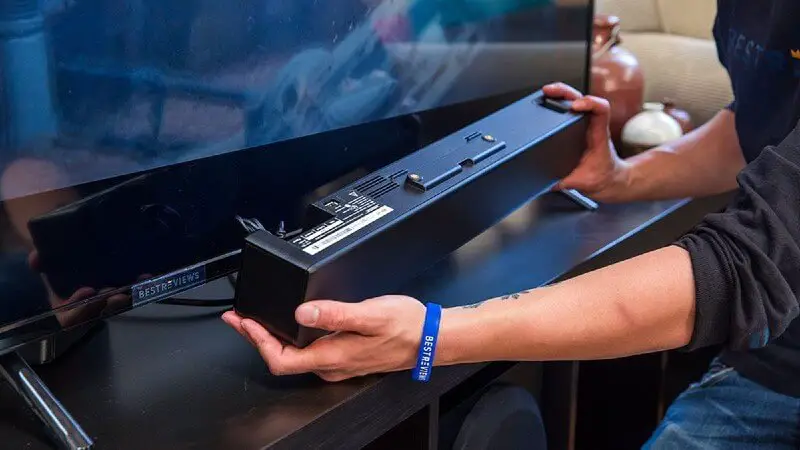
Adjust and Optimize Your Sound

After successfully connecting everything and adjusting all the settings, now you have to adjust the soundbar’s volume to optimize the Sound. You have to control it from your TV. 

Firstly, you have to start the process by turning the volume of the soundbar down by using your soundbar’s remote. Then play audio in different sound settings to find the best settings for you.

If you want to find a range to use the TV remote for the volume most of the time, you have to set the soundbar somewhere between 50-80% of its maximum volume output.

Controlling a Soundbar With a TV Remote – Instructions by TV Brand

The mentioned instructions above are a general way to connect your devices and control your soundbar with your TV. But many TVs from different manufacturers come with different ways of connection. Here you can find some instructions for different TV manufacturers; you can find your listed brand and follow the instructions.
TV Brand

Samsung

You can connect your TV and soundbar using an optical digital or HDMI ARC connection. To do this, you must use the appropriate cable and change the input of the soundbar to “D.IN”

Use a digital optical connection to the soundbar from your Samsung TV. You can hold the left direction on the Samsung TV remote’s direction pad to activate or deactivate Auto Power Link. This feature only works with an optical connection. Make sure that you have changed the TV’s audio output settings so that you can control your soundbar by your TV remote.

But use an HDMI ARC connection. The source of your soundbar will automatically change to TV ARC, and you will be able to use the TV remote’s right direction on the direction pad to activate/deactivate Anynet+. This feature only works with an HDMI ARC connection.

You can get more information on Samsung support.

LG

If you have an LG TV. You can connect your soundbar with your TV in many ways. Such as you can Sound Sync via Bluetooth, a digital optical connection, or an HDMI ARC connection. Moreover, LG TVs also come with Magic Remote.

If you want to use the Bluetooth wireless connection, you have to follow the given instructions:-

  1. Go to TV settings
  2. Then find the sound section
  3. Then select the Sound Out
  4. At last, you have to click on LG Sound Sync (Wireless). 

After doing these, The Device Selection button will appear and look for your soundbar. So make sure that the Bluetooth of your soundbar is turned on. Then select your soundbar and pair them. 

If you want to connect via the digital optical and HDMI ARC connection, the process is also the same. You’ll use the Sound> Sound Out area to change the output to HDMI or optical.

You can get more information by visiting LG support.

VIZIO

VIZIO TVs also use the same process as the instructions above to connect your soundbar with the TV through an optical or HDMI connection. The port for an optical connection on the VIZIO TV may be called ‘S/PDIF,’ and for an HDMI ARC connection, use ‘HDMI 1’, which is the ARC port.

When you use the HDMI ARC, your TV may automatically recognize your connection after inserting the cable. If it won’t, then you have to do it manually. For this, you use the menu on your VIZIO remote and go to System > CEC, then change the setting to ‘Disabled,’ ‘Enabled,’ or ‘ARC only,’ whatever you wish.

You can get more information by visiting VIZIO support.

Sony
Sony

You can easily connect your soundbar by using both the HDMI ARC connection and an optical digital audio cable. The setup process is also the same as the instructions listed above. When you will switch the audio output setting, make sure you select ‘Audio System’ for all setups.

One important thing you should know that Sony support said that when using an optical cable, you will not be able to manage functions that require an HDMI connection like power interlock and volume with the remote of your TV.

You can get more information by visiting Sony support

Hitachi

 Hitachi is a very well-known electronic manufacturer. They are well known because of their low-priced smart TVs. These TVs also come with Roku TV built-in. You can connect your soundbar to a Hitachi Roku TV and use your Roku remote to control all of your TV and media devices. 

But if you want to use the HDMI ARC connection, you have to go to TV settings > Audio > Audio Preferences. And set ‘Audio Mode’ to ‘Auto (DTS)’ to connect to your soundbar automatically. You also have to select ‘Auto-detect’ in the S/PDIF and ARC settings.  

After doing all these, you have to go back to ‘System’ on the main settings menu, then go to ‘CEC’ and click the checkboxes for HDMI ARC to give your Roku remote the ability to control your soundbar.

You can get more information by visiting Hitachi support.

Panasonic

Panasonic TVs are also able to connect to your soundbar for controls via the HDMI or digital optical connection. When you use the HDMI connection, you’ll find the ‘HDMI2 (ARC)’ input on your Panasonic TV. Fortunately, an app in Panasonic TV allows you to easily switch between your TV’s speakers and soundbar for audio if you connect via HDMI ARC.

But if you want to use the optical connection, the setup will be the same as above. You have to connect both your devices by an optical cable, and then you have to go to the TV settings, turn off the TV speaker, and change the source to ‘Optical.’

You can get more information by visiting Panasonic’s support page.

TCL

Most of the TCL TVs are compatible with the HDMI ARC connection. So you can use this connection for connecting and controlling your soundbar with a TCL TV remote. You should use a high-speed HDMI cable that supports ARC and CEC control.

After connecting HDMI ARC, you have to set everything up. For this, you have to go to Home > Settings > System > Control other devices (CEC) > HDMI ARC and Select the button to enable ‘HDMI ARC.’ Moreover, you also have to disable ‘System audio’ by unchecking the box by this feature.

You can get more information by visiting  TCL support.

Hisense

Most of the TCL TVs are compatible with the HDMI ARC connection. So you can use this connection to connect and control your soundbar; you can control your soundbar from your Hisense TV. You just have to connect your soundbar with your TV by using an HDMI-certified High-Speed 2.0 cable. Then go to your TV Settings > Sound > Speakers > ARC and turn off your TV’s speaker, and enable HDMI ARC.

To enjoy the best quality audio, you can also change the ‘Digital Audio Out.’ Go to Settings > Sound > Advanced Settings > Digital Audio Out > Dolby Digital Plus, and then connect using an optical cable.

You can get more information on the Nakamichi Help Desk.

Conclusion

After reading this article now, you know that controlling your soundbar with your TV remote is not a hard task. You just have to connect your TV with the soundbar and adjust your settings and Sound as necessary. Among the optical connection and HDMI ARC connection, the HDMI ARC connection is the easiest way to do it.

-our editorial board has reviewed this article and has been approved for publication according to our editorial policy.

Best Seller List of Soundbars:

Bestseller No. 1
Assistrust Sound Bar for Smart TV, Soundbar with Bluetooth/ARC/Opt/AUX Connect, Auto Volume Boost, 3...
  • 【𝐈𝐦𝐩𝐚𝐜𝐭𝐟𝐮𝐥 𝐕𝐨𝐥𝐮𝐦𝐞 𝐁𝐨𝐨𝐬𝐭】: Elevate faint sounds to vibrant with automatic loudness boost. Experience immersive sound through 4 versatile placements—horizontal for distortion-free audio, vertical for room-filling sound, tabletop for vibrant clarity, or wall mount for 360° cinematic magic. Transforms your room into a personal theater.
  • 【𝐄𝐩𝐢𝐜 𝐂𝐢𝐧𝐞𝐦𝐚 𝐀𝐮𝐝𝐢𝐨】: Powered by 4 high-performance drivers, 80W powerful sound output, it provide richer details, like soft whisper or subtle croon, whether deep thunder or sonorous roar, turn flat audioto vivid, adding weight to music, making the virtual game experience immersive.
  • 【𝐓𝐚𝐢𝐥𝐨𝐫𝐞𝐝 𝐒𝐨𝐮𝐧𝐝】: Fine-tune your listening experience with 3 dynamic equalizer modes—movie, music, and news. Enjoy rich, cinematic audio, luxurious melodies, and crystal-clear dialogue, tailored to enhance every scene and soundtrack. Spreading the audio evenly throughout a room, ensures that everyone, regardless of seating position, experiences the full range of sound.
  • 【𝐄𝐟𝐟𝐨𝐫𝐭𝐥𝐞𝐬𝐬 𝐔𝐬𝐞】: Enjoy seamless setup with cutting-edge Bluetooth 5.0 or reliable ARC, OPT, and AUX connections. In ARC mode, control your soundbar with ease using your TV remote, guided by our easy-to-follow instructions and video tutorials.
  • 【𝐄𝐱𝐜𝐞𝐩𝐭𝐢𝐨𝐧𝐚𝐥 𝐒𝐮𝐩𝐩𝐨𝐫𝐭】: Your satisfaction is our top priority. Enjoy peace of mind with our 18-month warranty and 24/7 online tech support. Our 60-day hassle-free replacement policy, with top-tier assistance whenever you need it.
SaleBestseller No. 2
Bose TV Speaker - Soundbar for TV with Bluetooth and HDMI-ARC Connectivity, All-in-One Compact...
  • HEAR YOUR TV BETTER: Designed with simplicity in mind, the Bose TV Speaker is an all-in-one soundbar that clarifies speech and is a simple fix for better TV sound
  • WIDE, NATURAL SOUND: 2 angled full-range drivers deliver a more realistic, spatial audio experience for overall better TV sound from a small soundbar
  • ENHANCED DIALOGUE: This sound bar for smart tv is designed to specifically focus on clarifying and elevating vocals and pronunciation
  • BLUETOOTH TV SPEAKER: Pair your device to this Bluetooth soundbar to wirelessly stream your favorite music and podcasts. Connect up to 3 devices through the inputs (HDMI, Optical in, and AUX in); the first powered on device will automatically connect
  • SIMPLE SETUP: A single connection from this compact soundbar to the TV via an optical audio cable (included) or an HDMI cable (sold separately) has you up and running in minutes
SaleBestseller No. 3
ULTIMEA 5.1CH Surround Sound Bar with Subwoofer, Dolby Atmos, VoiceMX, BassMX, APP, 300W Soundbar...
  • Simplified 5.1ch Dolby Atmos Setup: Enjoy immersive 4D sound with real Dolby Atmos and 5.1-channel audio. Five built-in speakers, including two side-firing drivers, create wide surround without rear speakers. Precision DSP ensures
  • Voice Clarity Enhancement: VoiceMX technology uses advanced DSP algorithms to isolate and enhance vocal frequencies in real time. Dialogue remains crisp and easy to follow by separating speech from background effects and music, even at low volumes or during intense scenes.
  • 300W Output with 6-Driver System: Featuring five precision-tuned full-range drivers and a dedicated wired wooden subwoofer, the system delivers up to 300W of peak power for bold, room-filling sound. With a frequency response of 45 Hz–18 kHz and a maximum SPL of 99 dB, it reproduces everything from subtle nuances to explosive cinematic effects.
  • 18 mm High-Excursion Driver: Powered by BassMX technology, the wired wooden subwoofer features a 18 mm high-excursion driver, a 5.3L tuned cabinet, and a high-density magnetic circuit. This design delivers deeper, tighter bass with greater air displacement and enhanced low-frequency performance—bringing more realism to every scene.
  • HDMI eARC for True Dolby Atmos: HDMI eARC supports up to 37 Mbps of bandwidth, unlocking the full potential of lossless Dolby Atmos 5.1-channel audio. Compared to standard ARC, eARC delivers richer surround effects and greater detail. CEC integration allows the TV and soundbar to work together with unified control.
Bestseller No. 4
Sony S100F 2.0ch Soundbar with Bass Reflex Speaker, Integrated Tweeter and Bluetooth, (HTS100F),...
  • Straight from the theater to your home: easy set-up, built-in tweeter, 2-ch speaker with simple Bluetooth connection
  • Deep sound with Bass Reflex speaker
  • High power with a slim design that matches any room and is perfect for small living spaces
  • Voice enhancement feature is great for TV content with hushed dialogue, or to make conference call participants easier to hear
  • Easy TV set up with HDMI ARC
Bestseller No. 5
Samsung HW-C450 2.1ch Soundbar w/DTS Virtual X, Subwoofer Included, Bass Boost, Adaptive Sound Lite,...
  • DTS VIRTUAL:X: Expand your listening experience; DTS Virtual: X creates spacious 3D sound putting you at the center of the action for an elevated and immersive home theater experience
  • SUBWOOFER INCLUDED: Get that big boom with our included subwoofer; Bring home intense sound with rich, powerful bass; Elevate the action and take things to the next level
  • BASS BOOST: Bass you can boost with a tap; Feel the depth of distant thunder as your listening experience is taken to another level; Tap the button Feel the power
  • ADAPTIVE SOUND LITE: Enjoy all your favorite video content with dynamically optimized audio and enhanced voice clarity so you can follow along with action packed games and blockbuster films
  • GAME MODE: Optimize your gaming experience with perfectly synced directional audio that moves with the onscreen action; Game Mode eliminates distractions so you can hear better and play harder
SaleBestseller No. 6
RIOWOIS Sound Bar for Smart TV, Soundbar for TV with Bass Reflector and Easy Set up, Home Audio...
  • 【Hearing Every Word】 Say goodbye to muffled dialogue and hello to our soundbar that brings words to life, making you feel like you're part of the conversation.
  • 【Compact yet Suitable】At a little over 2.5 inches in height, our sound bar is compact enough to fit in most spaces. You can easily mount it on the wall or place it in front of your TV without worrying about it blocking the bottom edge or IR remote sensor.
  • 【DSP&Three Sound Effects】With DSP, sound bar offers three sound modes or presets that cater to different program types, such as movies, music, news. These profiles can optimize the audio settings to suit the specific genre, enhancing your listening experience based on your preferences.
  • 【Compatible with Fire TV Remote】Soundbar is compatible with Fire TV remote control. Additional remotes compatible with Roku box or Roku TVs can be provided as per your request.
  • 【Hassle-free Installation】We've made the installation steps for the soundbar much simple. Plus, a special vibrant, easy-to-follow installation instructions has been included in the package. In case you still encounter any issues during the sound bar installation process, our dedicated after-sales team is always available to assist you!
Bestseller No. 7
Polk Audio Signa S4 TV Sound Bar with Subwoofer - Dolby Atmos Audio VoiceAdjust & BassAdjust...
  • ADVANCED ULTRA-SLIM SOUNDBAR AND WIRELESS SUB - The Signa S4 Dolby Atmos soundbar, 7-driver array, & dedicated full-range center channel deliver 3D surround sound; 5.9" sub creates WIDE SOUNDSTAGE, DEEP BASS (Waterproof: No)
  • UP-FIRING SPEAKERS FOR HEIGHT ELEVATION - As well as L/R Tweeters (0.98"), (2) Racetrack Mid Drivers (4.7"x1.57") and a 0.98" Center, the L/R elevation speakers (2.59") utilize Atmos' height channels for an immersive 3D sound over your head
  • POLK’S EXCLUSIVE VOICEADJUST TECHNOLOGY - Along with S4's center channel, this lets you adjust voice levels to hear clear dialog without missing a word. For max impact, control the Bluetooth sound bar with subwoofer using Bass Adjust Technology
  • EXCELLENT SOUND AND VALUE - At par with mid to high-range soundbar with wireless subwoofer. At 2.36", the Signa S4 easily fits most spaces, including your wall or in front of your screen. It won’t block your TV’s bottom edge/ IR remote sensor
  • 1-CABLE SETUP, WORKS WITH ANY TV INCLUDING THE LATEST 8K ULTRA-HD SETS - Get these sound bars for TV up and running in under 5 minutes—all you need to do is unbox, connect and you are ready to listen. A great addition to your home theater!
Bestseller No. 8
VIZIO V-Series 2.0 Compact Sound Bar with Dolby Audio, DTS:X, Bluetooth V20x-J8
  • Compact, versatile design – Sleek, rounded all-black finish with easy-to-clean textured surface, optimized for small-med rooms.
  • DTS Virtual:X – Sound Enhancement for room-filling, floor-to-ceiling virtualized sound
  • Full-Range Speakers – 2 full-range speakers in the sound bar provide coherent sound and brilliant clarity.
  • Optimized for 4K HDR Content with Dolby Audio – Bring out the best audio performance from your 4K HDR content with Dolby Audio when connected through HDMI.
  • 70Hz – 20kHz Frequency Response – Wide, natural frequency response means you can hear what the artist intended.
Bestseller No. 9
VIZIO 5.1 Soundbar SE, Wireless Subwoofer, Surround Sound w/Dolby Atmos & DTS:X, Bluetooth Speaker,...
  • Three full-range speakers inside the soundbar, two surround speakers, and one wireless compact subwoofer deliver 96dB of detailed and dynamic high-impact sound that’s perfect for medium to large-sized rooms.
  • Soundbar remote control sold separately.
  • Receive the latest product updates and adjust advanced soundbar settings by downloading the VIZIO mobile app for your Android or iOS device (A VIZIO Account is required.)
  • Use your existing TV remote to control volume on your soundbar when connected through your TV's HDMI eARC port. (HDMI eARC Output ONLY.) No TV HDMI port? No problem! Contact VIZIO customer support 844-254-8087 or visit support.VIZIO.com if your TV requires optical connection.
  • When watching Dolby Atmos and DTS:X content, this soundbar puts you at the center of your entertainment, creating an immersive audio experience
Bestseller No. 10
Samsung B-Series Soundbar HW-B550F 2.1 ch DTS Virtual:X Soundbar with Subwoofer (2025 Model) Voice...
  • FULL, BALANCED SOUND WITH A SUBWOOFER INCLUDED: Hear every beat, rumble and roar with deep and rich bass that fills any space. With the included wireless subwoofer, experience powerful sound that draws you in from the very first scene.
  • MULTI-DIRECTIONAL SPATIAL AUDIO THAT COMES FROM ALL AROUND YOU: Let immersive virtual surround sound draw you in, with spatial audio that moves all around you. Feel at the center of all your movies, shows and games without the need for rear speakers.
  • AN EXTRA PUNCH OF BASS FOR SOUND YOU CAN FEEL: Add more excitement with deeper, fuller sound in your favorite heart-pumping, beat-thumping content. Enjoy a rush of extra powerful bass in your favorite movie scenes, trending songs and more.
  • OPTIMIZED SOUND FOR EVERY SCENE: Get the optimal listening experience for each scene. The soundbar recognizes the type of content you’re watching and automatically adapts audio settings to produce clear voices and detailed sounds.
  • PICK UP EVERY PIECE OF DIALOGUE: Hear voices more clearly with automatically amplified dialogue allowing it to stand out so you don't miss a word, no matter what you're watching.

You May Also Like…

Rate this post

Last update on 2026-01-19

TheaterDIY is a dedicated platform where I passionately share my vast knowledge and experiences in the realm of home theaters and home electronics. My expertise and insights are a guiding light for enthusiasts seeking to create their own cinematic havens.
