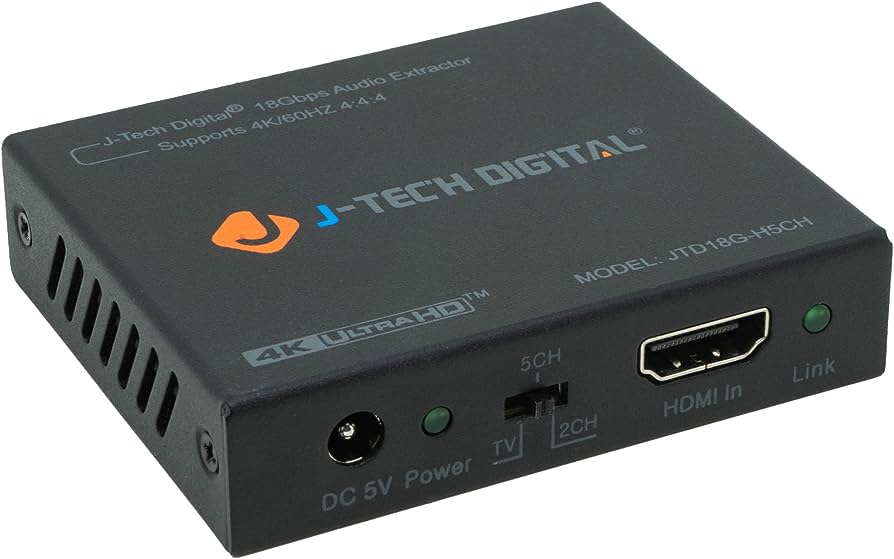
An hdmi audio extractor is a device that allows you to extract the audio signal from an hdmi source and output it to other audio devices. It is commonly used when you want to connect your hdmi device, such as a gaming console or blu-ray player, to non-hdmi speakers or audio systems.
With an hdmi audio extractor, you can separate the audio signal from the hdmi signal and send it to external speakers or audio receivers via different output options like 3. 5mm aux, rca, or optical audio ports. This allows you to enjoy high-quality audio from your hdmi source on your preferred audio setup.
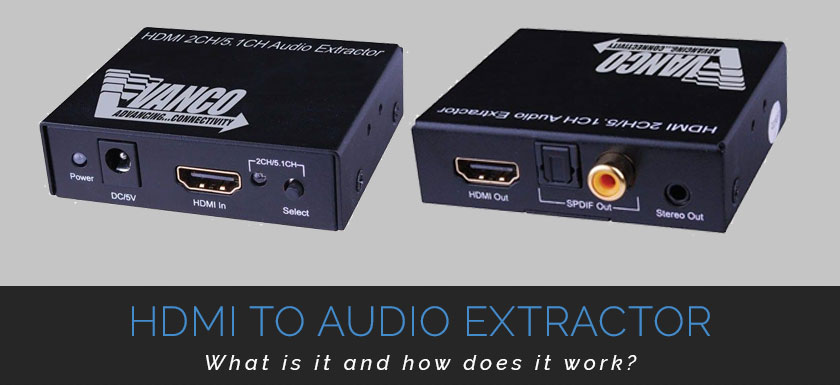
Credit: www.pacrad.com
Importance Of High-Quality Audio Extraction
An hdmi audio extractor plays a crucial role in the high-quality audio output of audiovisual systems. It extracts audio signals from an hdmi source, allowing for a seamless and immersive audio experience.
Enhancing Your Audio Experience:
An hdmi audio extractor is a device that allows you to separate the audio signal from an hdmi source, such as a tv or a gaming console, and send it to a different audio output. This can greatly enhance your audio experience by providing the flexibility of connecting your hdmi source to various audio systems or devices.
The importance of high-quality audio extraction cannot be overstated. Here’s why:
- Flexible audio output options: With an hdmi audio extractor, you can connect your hdmi source to a wide range of audio systems or devices, such as soundbars, speakers, headphones, or home theater systems. This gives you the freedom to choose the audio output that best suits your preferences or the requirements of your setup.
- Improved sound quality: By extracting the audio signal from the hdmi source and sending it to a dedicated audio system or device, you can enjoy enhanced sound quality. The audio extractor ensures that the audio is transmitted without any interference or loss of quality, resulting in a clear and immersive audio experience.
- Compatibility with older audio systems: In some cases, older audio systems may not have hdmi inputs. By using an hdmi audio extractor, you can bridge the gap between your hdmi source and the audio system, allowing you to enjoy your media on older equipment without compromising on audio quality.
- Parallel audio transmission: Hdmi audio extractors often come with multiple audio outputs, such as optical, rca, or 3.5mm audio jacks. This enables you to transmit the audio signal simultaneously to multiple devices or systems, creating a multi-room audio setup or allowing different people to listen to the same content using their preferred audio devices.
- Easier troubleshooting: An hdmi audio extractor can also simplify troubleshooting audio-related issues. By separating the audio signal from the hdmi source, it becomes easier to identify and resolve any problems that may arise, as you can isolate the audio path for testing or troubleshooting purposes.
Immerse yourself in high-quality sound:
An hdmi audio extractor empowers you to immerse yourself in high-quality sound by providing versatile audio output options, improved sound quality, compatibility with older audio systems, parallel audio transmission, and simplified troubleshooting. Whether you’re watching movies, playing games, or listening to music, a high-quality audio extraction solution can enhance your overall audio experience, bringing your media to life with immersive and rich sound.
Enjoy the full potential of your media:
With an hdmi audio extractor, you can unlock the full potential of your media by ensuring that the audio is as impressive as the visuals. By separating the audio signal and connecting it to the right audio system or device, you can enjoy clear dialogues, crisp sound effects, and immersive soundscapes that add depth and dimension to your favorite movies, tv shows, games, and music.
Investing in a high-quality hdmi audio extractor can make a significant difference in your audio experience, allowing you to enjoy your media to the fullest and create a personalized audio setup that suits your preferences. Experience the power of high-quality audio extraction and elevate your entertainment to a whole new level.
What Does An Hdmi Audio Extractor Do?
An hdmi audio extractor is a device that allows you to separate the audio signal from an hdmi connection and output it to other audio devices such as speakers or headphones. It enables you to enjoy high-quality audio without the need for additional hdmi audio equipment.
Understanding The Basic Functionality:
An hdmi audio extractor is a device that allows you to separate audio signals from hdmi sources. It is commonly used when you want to extract the audio from an hdmi signal and send it to a separate audio output device, such as speakers or headphones.
By using an hdmi audio extractor, you can have more flexibility in managing your audio output options.
Extracting Audio Signals From Hdmi Sources:
- Hdmi audio extractors are designed to extract audio signals from hdmi sources, such as tvs, gaming consoles, blu-ray players, and set-top boxes.
- They have input ports to connect the hdmi source and output ports to connect the audio device.
- When the hdmi audio extractor is connected between the hdmi source and the audio device, it can extract the audio signals from the hdmi signal and send them to the connected audio device.
Separating Audio And Video Signals For Flexible Output Options:
- One of the main advantages of using an hdmi audio extractor is the ability to separate audio and video signals.
- This allows you to have more flexible output options, as you can connect the extracted audio signals to different audio devices while keeping the video signal connected to your display device.
- For example, you can extract the audio from a gaming console and connect it to a gaming headset, while still enjoying the visuals on your tv screen.
- Some hdmi audio extractors also offer additional audio output options, such as optical toslink or rca stereo outputs, providing compatibility with a wider range of audio devices.
Using an hdmi audio extractor gives you the flexibility to customize your audio output setup according to your preferences and device compatibility. Whether you want to enhance your gaming experience with high-quality audio or connect your hdmi source to external speakers, an hdmi audio extractor can help you achieve just that.
How Does An Hdmi Audio Extractor Work?
An hdmi audio extractor enables you to extract audio from an hdmi signal, allowing you to connect external audio devices such as speakers or headphones. It converts the audio signal into different formats, such as 3. 5mm audio or rca audio, giving you the flexibility to use the audio in various ways.
Exploring The Internal Workings:
An hdmi audio extractor is a device that allows you to separate the audio signal from an hdmi source, such as a blu-ray player or gaming console. It serves as a bridge between the hdmi input and various output options, enabling you to extract the audio and send it to different devices or systems.
Here’s how an hdmi audio extractor works:
- The device receives an hdmi input signal, which carries both video and audio information.
- It then processes the incoming signal to extract the audio content.
- After extracting the audio, the device converts it to a compatible format that can be transmitted through different types of ports.
- Finally, the extracted audio is outputted through different ports, such as hdmi, analog l/r (left/right), or optical toslink, depending on the connectivity options available on the device.
Now, let’s take a closer look at each step of the process:
Processing And Converting Audio Signals:
- The hdmi audio extractor takes the incoming hdmi signal and separates the audio from the video.
- It uses advanced processing techniques to extract the audio content from the hdmi input.
- The device can support various audio formats, including dolby digital, dts, and pcm (pulse code modulation).
- Once the audio is separated, the extractor converts it to a format that can be transmitted through the chosen output port.
Outputting Audio Through Different Ports And Formats:
- An hdmi audio extractor offers flexibility in terms of audio output options.
- It typically provides multiple types of output ports, such as hdmi, analog l/r (stereo), and optical toslink (digital).
- The hdmi output port allows you to route the audio back to your tv or display device through a single hdmi cable.
- The analog l/r output ports enable you to connect the extractor to speakers, amplifiers, or other audio devices that support analog audio.
- The optical toslink output port is ideal for transmitting the audio signal to devices that require a digital audio connection, such as soundbars or av receivers.
- Some extractors may also offer additional features, such as volume control, audio format selection, or audio delay adjustments to cater to specific audio setups.
An hdmi audio extractor functions by processing and converting the audio signal from an hdmi source, and then provides various output options to cater to different audio setups. This allows you to extract and utilize the audio separately, giving you greater flexibility and control over your audio experience.
Choosing The Right Hdmi Audio Extractor
Looking to choose the right hdmi audio extractor? Find out what an hdmi audio extractor is and how it can enhance your audio experience. Explore various options available to get the best one for your needs.
When it comes to selecting the right hdmi audio extractor for your needs, there are a few important factors to consider. This guide will walk you through the key features to look out for to ensure compatibility with your existing devices and to make sure you can enjoy the audio formats you desire.
Factors To Consider Before Making A Purchase:
- Compatibility with your existing devices:
- Check if the hdmi audio extractor is compatible with the devices you plan to connect it to, such as your tv, gaming console, or blu-ray player.
- Ensure that the extractor supports the hdmi version of your devices to avoid any compatibility issues.
- Look for hdmi extractors that offer multiple hdmi inputs, allowing you to connect multiple devices simultaneously.
- Output options and audio formats supported:
- Determine the audio formats you want the hdmi audio extractor to support, whether it’s stereo, 5.1 surround sound, or even the latest dolby atmos.
- Look for hdmi audio extractors that offer various output options, such as hdmi, optical toslink, or rca audio. This ensures that you can connect your desired audio output device seamlessly.
- Consider the resolution you want your hdmi audio extractor to support, whether it’s standard hd (1080p) or ultra hd (4k). Ensure that the extractor is capable of handling your preferred resolution.
Now that you know the factors to consider, you can make an informed decision when choosing the right hdmi audio extractor for your setup. By ensuring compatibility with your existing devices and selecting an extractor with the desired output options and audio formats supported, you can enhance your audio experience and enjoy your favorite movies, games, and music to the fullest.
Setting Up And Configuring Your Hdmi Audio Extractor
Setting up and configuring your hdmi audio extractor is a straightforward process that allows you to extract audio from your hdmi source. This device is essential if you want to enhance your audio experience and connect your hdmi devices to external speakers or headphones.
Simply follow the provided instructions to set up and configure your hdmi audio extractor for optimal sound output.
Setting up and configuring your hdmi audio extractor is a straightforward process that allows you to enhance your audio experience when using hdmi devices. By following this step-by-step guide, you’ll be able to seamlessly install and optimize your hdmi audio extractor.
Whether you’re a tech-savvy individual or a beginner, this guide will help you get the most out of your audio setup.
Step-By-Step Guide For Seamless Installation:
- Identify the necessary cables: Before you begin, make sure you have all the required cables for the installation. Typical cables needed include an hdmi cable, an audio cable (such as rca or 3.5mm), and a power adapter for the audio extractor.
- Power off all devices: To prevent any potential damage, power off all devices involved in the installation, including your tv, audio receiver, and any other hdmi-enabled devices.
- Connect the hdmi audio extractor: Take the hdmi cable and connect one end to the hdmi output port on your source device, such as a gaming console or blu-ray player. Connect the other end of the hdmi cable to the hdmi input port on the audio extractor.
- Connect the output cables: Depending on your audio setup, choose the appropriate cables to connect the audio extractor to your speakers or audio receiver. This can be either an rca cable or a 3.5mm audio cable. Insert one end into the corresponding output ports on the audio extractor and connect the other end to your speakers or audio receiver.
- Power on all devices: Once all the connections are complete, power on all the devices in the following order: audio extractor, tv, audio receiver, and the source device.
Connecting The Hdmi Audio Extractor To Your Devices:
- Connect the hdmi cable from the audio source device to the hdmi input port on the audio extractor.
- Connect the audio cable from the audio extractor’s output port to the audio input on your speakers or audio receiver.
Configuring Audio Settings For Optimal Performance:
- Access the settings menu on your audio extractor. This can usually be done by pressing the “menu” button on the remote control or the extractor itself.
- Navigate to the audio settings section and choose the desired audio output format, such as stereo or surround sound.
- Adjust the volume levels on both the audio extractor and your speakers or audio receiver to achieve the optimal audio experience.
By following these steps, you can set up and configure your hdmi audio extractor with ease. Enjoy enhanced audio quality and a seamless audio experience while using your hdmi devices.
Common Applications Of Hdmi Audio Extractors
An hdmi audio extractor is a device that allows you to separate the audio signal from an hdmi source, providing a convenient way to connect audio devices such as speakers or headphones. It is commonly used in home theaters, gaming setups, and professional audio installations.
Hdmi audio extractors are versatile devices that serve various purposes in different settings. Let’s explore some common applications of hdmi audio extractors:
Home Theater Setups:
- Extract audio from hdmi sources, such as blu-ray players and streaming devices, and send it to your audio system for a high-quality sound experience.
- Connect your tv’s hdmi arc (audio return channel) port to the audio extractor to bypass the need for separate audio cables and simplify your setup.
Gaming Consoles And Pcs:
- Enhance your gaming experience by extracting audio from gaming consoles or pcs to external speakers or headphones.
- Enjoy immersive sound effects and crystal-clear dialogue by connecting the hdmi audio extractor between your console or pc and the display device.
Presentations And Conferences:
- Connect your laptop or computer to a projector or display device through an hdmi audio extractor, allowing you to extract audio and send it to external speakers or an audio system.
- Ensure that your audience can hear your presentations clearly without relying on the built-in speakers of projectors or laptops.
By utilizing hdmi audio extractors in these applications, you can improve your audio setup, enhance your gaming experience, and deliver high-quality audio in presentations and conferences. Whether you want to create a cinematic experience in your living room or make your gaming sessions more immersive, hdmi audio extractors offer a convenient and effective solution.
Troubleshooting And Tips For Hdmi Audio Extraction
An hdmi audio extractor is a device that allows you to separate the audio signal from an hdmi source and extract it to different output options. Troubleshooting and tips for using an hdmi audio extractor can help ensure a seamless audio experience for your devices.
Common Issues And How To Resolve Them:
- No audio output: Make sure to check the connection of your hdmi audio extractor and ensure that it is properly connected to the devices. Additionally, check if the audio output settings of the source device (e.g., tv, blu-ray player) are correctly configured.
- Poor audio quality: If you are experiencing low-quality audio, try adjusting the audio output settings on your hdmi audio extractor. You may also want to check if there are any firmware updates available for your extractor device.
- Audio syncing issues: If the audio is out of sync with the video, you can try adjusting the audio delay settings on your hdmi audio extractor. This will help align the audio with the visuals for a seamless viewing experience.
- Unsupported audio formats: Sometimes, certain audio formats may not be supported by your hdmi audio extractor. In such cases, you can try connecting the source device directly to your audio system for better compatibility.
Optimizing Audio Settings For The Best Results:
- Select the appropriate audio output format: Depending on your audio system, you may need to choose between stereo, 5.1 surround sound, or other audio formats. Ensure that the audio output format in your hdmi audio extractor matches the capabilities of your audio system for optimal performance.
- Adjust volume levels: To ensure a balanced audio experience, adjust the volume levels of your hdmi audio extractor and connected devices (e.g., tv, speakers). This will help maintain consistent audio output across different media sources.
- Use high-quality hdmi cables: Invest in high-quality hdmi cables to minimize signal loss and ensure the best audio transmission between devices. Poor quality cables can result in audio distortions and decreased sound quality.
Additional Tips For A Smooth Audio Extraction Experience:
- Power cycle your devices: If you encounter any audio-related issues, try power cycling all the devices involved. Simply turn off and unplug your hdmi audio extractor, source devices, and audio system. Then, plug them back in and power them up in the correct sequence (e.g., source device first, then hdmi audio extractor, and finally audio system).
- Update firmware: Regularly check for firmware updates for your hdmi audio extractor. Manufacturers often release firmware updates to address bugs, improve performance, and enhance audio compatibility.
- Double-check device compatibility: Before purchasing an hdmi audio extractor, ensure that it is compatible with your specific devices. Check the supported audio formats, resolutions, and hdmi versions to avoid any compatibility issues.
- Read user manuals: Familiarize yourself with the user manuals of your hdmi audio extractor and other connected devices. This will help you understand the specific features, settings, and troubleshooting steps relevant to your setup.
With these troubleshooting tips and optimization techniques, you can enhance your hdmi audio extraction experience and enjoy high-quality audio output from your devices.
Frequently Asked Questions Of What Is An Hdmi Audio Extractor?
How Does Hdmi Audio Work?
Hdmi audio works by transmitting digital audio signals along with the video data through a single hdmi cable. This eliminates the need for separate audio cables and provides high-quality audio. The hdmi audio signals can be decoded by the receiving device, such as a tv or av receiver, to produce sound.
Hdmi supports various audio formats, including stereo, surround sound, and high-resolution audio. It also supports the arc (audio return channel) feature, which allows the tv to send audio signals back to the av receiver or soundbar. This enables you to enjoy the audio from the tv’s built-in apps or connected devices through your external audio system.
Overall, hdmi audio simplifies the connection and transmission of audio signals, providing a seamless and immersive audio experience with your video content.
How Do I Get Audio Output From Hdmi?
To get audio output from hdmi, you can use an hdmi audio extractor. An hdmi audio extractor is a device that allows you to separate the audio signal from the hdmi signal and output it to a separate audio device.
It typically has inputs for hdmi and outputs for various audio connections, such as 3. 5mm aux, rca, or optical. Simply connect the hdmi cable from your video source (such as a dvd player or gaming console) to the hdmi input of the audio extractor.
Then, connect the hdmi output of the audio extractor to your tv or display device. Finally, connect your desired audio output device (such as speakers or headphones) to the audio output ports of the extractor. Make sure to select the appropriate audio output on your tv or device settings.
By using an hdmi audio extractor, you can enjoy audio output from your hdmi sources through separate audio devices or speakers.
Does Firestick Work With Hdmi Audio Extractor?
Yes, the firestick is compatible with an hdmi audio extractor.
What Is Audio Extraction?
Audio extraction refers to the process of separating audio content from a video or audiovisual file. It involves extracting the audio track from the original source and saving it as a separate file format, such as mp3 or wav. This extracted audio can then be used for various purposes, including creating podcasts, remixing music, adding voiceovers, or simply enjoying the audio content without the accompanying video.
Audio extraction can be done using specialized software or online tools that allow users to upload their files and extract the audio content quickly and easily. By separating the audio from the video, users can manipulate and utilize the audio content in different ways, making it a useful tool for content creators, musicians, and audio enthusiasts.
Conclusion
To sum up, an hdmi audio extractor is a device that allows you to separate the audio signal from your hdmi source and route it to different audio outputs. It can be useful in various situations, such as connecting older audio equipment that doesn’t have an hdmi input, or when you want to send the audio signal to external speakers or amplifiers.
By using an hdmi audio extractor, you can enhance your audio experience and have more flexibility in setting up your home theater system. It’s important to choose a high-quality hdmi audio extractor that supports the desired audio formats and has reliable performance.
With the right device, you can enjoy improved sound quality and better control over your audio setup. So, if you’re looking to enhance your audio setup and make the most out of your hdmi connections, consider investing in an hdmi audio extractor.
