To use Spectrum Cloud DVR, navigate to your Spectrum Guide, select the program you wish to record, and choose the “Record to Cloud DVR” option. Users can enjoy recorded content on various devices, thanks to the Spectrum TV app.
Optimizing Your Experience: Spectrum Cloud DVR Tips
The advent of cloud-based digital video recording (DVR) has simplified the way we watch TV, giving viewers control over their schedules without the need for physical storage devices. Spectrum, a leading provider in cable TV and internet services, offers a Cloud DVR feature that seamlessly integrates with its users’ lifestyles, providing convenience and flexibility.
With cloud DVR, Spectrum customers can record, pause, and rewind live TV, maintaining their connection to their favorite shows and episodes. The service’s compatibility with the Spectrum TV app allows for viewing on an array of devices, ensuring entertainment is never out of reach. Perfect for those who value ease of access and mobility in their viewing experience, Spectrum Cloud DVR is an indispensable tool for modern television watching.
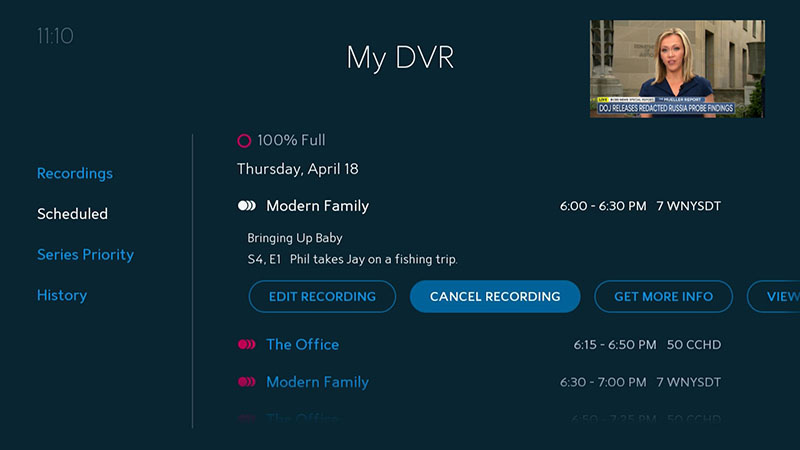
Credit: www.spectrum.net
Spectrum Cloud Dvr Basics
Stepping into the age of convenience and flexibility, Spectrum Cloud DVR revolutionizes the way subscribers watch and manage their favorite programs. This service lets users record, pause, and play television shows from anywhere, making it easier than ever to enjoy entertainment on their own terms. Ready to dive in? Let’s explore the essentials of this innovative feature.
Understanding the service
Understanding The Service
Spectrum Cloud DVR (Digital Video Recorder) is a game-changing service that allows users to record TV shows and films directly to a cloud server. This means recordings are stored remotely and accessible across multiple devices with a Spectrum TV subscription. There’s no need for bulky hardware or concern over limited physical storage space. With the ability to schedule recordings and manage your library online, viewing preferences are controlled with unprecedented ease.
Spectrum subscription requirements
Spectrum Subscription Requirements
To use Spectrum Cloud DVR, it’s essential to have an active Spectrum TV subscription that includes the Cloud DVR service. Based on the plan, storage space and the number of shows you can record concurrently may vary. For optimal experience, choosing a package that meets your viewing habits is vital. Confirm eligibility by signing into the Spectrum account and navigating to the package details.
Hardware compatible with Spectrum Cloud DVR
Hardware Compatible With Spectrum Cloud Dvr
One of the main benefits of Spectrum Cloud DVR is its compatibility across a spectrum of devices. Have a look at the hardware that supports this service:
- Spectrum-compatible cable boxes: Use your DVR functionality right on your TV, the traditional way.
- Smart TVs: Various smart TV brands offer apps that sync with Spectrum services.
- Streaming devices: Devices like Roku, Apple TV, and Amazon Fire TV also support Spectrum TV apps.
- Mobile devices: Smartphones and tablets are not left out – manage and watch DVR recordings on the go.
- Computers: Stream directly via web browsers with Spectrum’s online streaming portal.
Seamless integration across these devices ensures that your entertainment travels with you, regardless of your location.
Activate Spectrum Cloud DVR
Unlock the potential of your television experience with the advanced features of Spectrum Cloud DVR. From seamless streaming to managing your favorite shows at the touch of a button, this service transforms how you interact with your content. To harness the full power of Spectrum Cloud DVR, you must first activate the service on your account. Follow the detailed guide below to get started and dive into a world of convenient, cutting-edge TV watching.
Steps To Enable The Service On Your Account
Activating your Spectrum Cloud DVR service is straightforward. By following a series of simple steps, you can easily set up your account for DVR access.
- Sign in to the Spectrum.net portal using your Spectrum username and password.
- Head over to the ‘Services‘ section.
- Select the ‘TV‘ tab to manage your television services.
- If eligible, you will see an option for ‘Cloud DVR‘. Click on this to proceed.
- Choose the subscription level that suits your needs and confirm the activation of your Cloud DVR service.
Once you’ve successfully enabled Cloud DVR, it will be ready to use across all compatible devices linked to your Spectrum account.
With Cloud DVR now active, navigating through Spectrum’s user interface to find and record your favorite shows is effortless. Here’s a quick guide:
- Access the Spectrum TV app on your device.
- Use the ‘Guide‘ to browse through channels and shows.
- When you find a show you want to record, select it to view the show’s details.
- Look for the ‘Record‘ option. This might appear as an icon resembling a record button.
- Choose whether to record ‘single episode‘ or ‘entire series‘ according to preference.
Browsing recordings and scheduled items is similarly intuitive. Simply go to the ‘My Recordings‘ section to view, manage, or play your content.
Smart Streaming With Spectrum DVR
Welcome to the world of Smart Streaming with Spectrum DVR, your ultimate hub for never missing your favorite shows and movies, no matter how hectic your schedule gets. With Spectrum’s Cloud DVR, you have the power to record, manage, and customize your viewing experience with ease and flexibility. Discover how to make the most out of your Spectrum DVR and tailor your TV viewing to fit perfectly into your lifestyle.
Recording Shows And Movies
Want to save your must-watch list for later? Follow these simple steps to record all your preferred content:
- Open your Spectrum TV app or use your Spectrum remote to access the guide.
- Browse or search for the show or movie you wish to record.
- Select the program and simply hit the ‘Record’ button.
- Choose to record the episode or opt for the full series.
With the sophisticated recording features, you’ll never have to miss a moment of entertainment. Keep up with live events, series premieres, or blockbuster movies by scheduling your recordings in advance.
Managing Your Dvr Library
Effortlessly organize and access your DVR content with these management tips:
- Navigate to ‘My Library’ in your Spectrum TV app to view all recorded contents.
- Edit your recordings by renaming, protecting, or deleting files.
- Monitor your DVR storage capacity and manage space as needed.
Keep your library clutter-free and prioritize your viewing. The management tools of Spectrum DVR ensure that you have the content you want at your fingertips while maintaining ample storage for new recordings.
Customizable Settings For An Optimal Experience
Spectrum DVR offers a variety of customizable settings to enhance your viewing pleasure:
- Recording Quality
- Choose from multiple recording quality options to conserve space or enjoy high definition.
- Automatic Series Management
- Set up your DVR to automatically record all episodes of a series, or only the new ones.
- Parental Controls
- Protect your family with customizable parental controls that block unsuitable content.
By taking advantage of these settings, you can create a truly personalized TV experience. Adjust your preferences to fit your lifestyle, ensuring every streaming session with your Spectrum DVR is optimal.
How To Use Spectrum Cloud DVR Effectively?
Welcome to the ultimate guide on How to Use Spectrum Cloud DVR Effectively. The Spectrum Cloud DVR has revolutionized the way we watch TV by allowing us to record, store, and access our favorite shows and movies in the cloud. But to truly get the most out of this innovative service, it’s essential to understand how to utilize its features to the fullest. Whether you’re a new subscriber or an experienced user, the following tips, troubleshooting advice, and advanced functions will help you streamline your viewing experience.
Tips And Tricks For Efficient Streaming
Enhance your streaming experience with these easy-to-follow tips:
- Organize Your Recordings: Keep your content sorted by using the ‘Favorites’ and ‘Folders’ features to categorize shows and movies, making them easier to find.
- Manage Your Storage: Regularly review your cloud storage to delete recordings you no longer need, ensuring you always have space for new content.
- Set Series Recordings: Use the ‘Series Record’ option to automatically record all episodes of your favorite series as they air, so you never miss out.
- Stream On Multiple Devices: Take advantage of the ability to stream your recordings on various devices, ensuring entertainment wherever you go.
Troubleshooting Common Issues
Encounter an issue? Here’s how to resolve some common problems:
- Buffering or Playback Errors: Check your internet connection, and try restarting your modem or router if speeds are slow.
- Unable to Record: Ensure your Cloud DVR storage is not full. If it is, delete some older recordings to free up space.
- Missing Recordings: Verify that the show or movie was scheduled to record and check if it is available On Demand as an alternative.
- App Crashes: Try clearing the app’s cache or uninstall and reinstall the Spectrum TV app to refresh its settings and functions.
Advanced Features For Power Users
Maximize your Cloud DVR with these advanced features:
| Feature | Description | Benefit |
|---|---|---|
| Remote Recording: | Schedule recordings from your mobile device using the Spectrum TV app. | Convenience in recording shows when away from your TV. |
| Smart Search: | Use voice commands or type to search for shows across live TV, On Demand, and your DVR. | Speed up the process of finding the content you love. |
| Parental Controls: | Set restrictions on what can be watched or recorded, based on content ratings. | Maintain control over what content is accessible to children. |
| Download & Go: | Download your DVR recordings to your mobile device and watch them offline. | Enjoy your favorite shows without the need for an internet connection. |
Enhance Your Viewing Experience
Unlock a universe of convenience and tailored viewing pleasure with Spectrum’s Cloud DVR service. Revolutionize the way you watch TV by integrating cloud-based technology with your favorite shows and movies. Dive into a seamless viewing experience where flexibility and control are right at your fingertips. With Spectrum’s Cloud DVR, never miss a moment of your most-loved content, regardless of your schedule.
Integrating Cloud DVR with other Spectrum services
Integrating Cloud Dvr With Other Spectrum Services
Streamline your entertainment by integrating Cloud DVR with Spectrum’s vast array of services. Here’s how you can boost your viewing game:
- Unified Account: Combine your Spectrum Internet, TV, and Voice services for a holistic ecosystem.
- On-Demand Library: Access the Cloud DVR’s capabilities alongside an extensive on-demand selection.
- Personalized Profiles: Create profiles that remember your DVR preferences, syncing them across Spectrum services.
Mobile streaming with the Spectrum TV app
Mobile Streaming With The Spectrum Tv App
Crave your TV fix on the go? Embrace the freedom to stream your DVR recordings through the Spectrum TV app. With just a few taps on your device, you can:
- Download the Spectrum TV app on your smartphone or tablet.
- Log in using your Spectrum credentials for instant access to your DVR recordings.
- Enjoy live TV and DVR content anytime, anywhere, right in the palm of your hand.
Sharing DVR content across devices
Sharing Dvr Content Across Devices
Seamless connectivity is key to a modern TV-viewing experience. Spectrum Cloud DVR excels in delivering this by enabling content sharing across multiple devices at home. With this feature, you can:
| Functionality | Benefit |
|---|---|
| Start Watching on One Device | Begin an episode on your phone and finish on your TV seamlessly. |
| Multi-Device Playback | Stream different recordings on various devices simultaneously. |
| Centralized Management | Manage your DVR settings from any device with Spectrum service. |
Relish a connected, flexible, and enriching DVR experience that transforms how you consume media across all your devices.
Stream Like A Pro
For avid streamers and media enthusiasts seeking the ultimate viewing experience, Spectrum Cloud DVR revolutionizes the way we consume television. By embracing Spectrum’s innovative Cloud DVR service, users can effortlessly capture, store, and stream their favorite content with convenience and ease. The key to mastering this powerful tool lies within a few strategic enhancements to your streaming routine. Let’s dive into how to elevate your streaming game to professional levels.
Creating The Ultimate Streaming Setup
A proper streaming setup is the cornerstone of any pro streamer’s repertoire. To craft your ideal environment, consider the following essentials:
- A high-resolution smart TV or a streaming device capable of 4K playback
- Ergonomic seating that combines comfort with clear sightlines
- Optimized lighting to reduce glare and strain on the eyes
- A reliable home network with a strong router positioned for optimal signal coverage
Ensure your equipment is updated to the latest firmware, which often includes improvements and new features that enhance your streaming experience.
Recommended Internet Speeds For Seamless Playback
| Type of Streaming | Minimum Recommended Speed |
|---|---|
| SD Streaming | 3 Mbps |
| HD Streaming | 5-8 Mbps |
| 4K Streaming | 25 Mbps |
For households with multiple devices and simultaneous streams, a higher-bandwidth plan is suggested to maintain constant, high-quality playback.
Protecting Your Privacy While Using Spectrum Services
Staying secure in the digital space is a priority for all users. Employ these tactics to shield your privacy when streaming with Spectrum:
- Regularly update your account password to a robust, unique phrase that combines letters, numbers, and symbols.
- Enable two-factor authentication for enhanced security against unauthorized access.
- Be aware of the privacy settings and opt-out of any unnecessary data collection within the Spectrum app.
- Connect to a VPN when streaming to encrypt your online activity and hide it from prying eyes.
By following these guidelines, you can maintain control over your personal information and enjoy a safe streaming experience with Spectrum Cloud DVR.
Frequently Asked Questions

How Does Spectrum Cloud DVR Work?
Spectrum Cloud DVR allows you to record TV programs and store them in the cloud. You can record multiple shows at once and access them from any Spectrum-compatible device. The service integrates seamlessly with your Spectrum TV subscription.
Can I Watch DVR recordings On Multiple Devices?
Yes, with Spectrum Cloud DVR, you can watch your recordings on various devices. These include your TV, smartphone, tablet, or computer, ensuring you have access to your content anytime and anywhere within the Spectrum service area.
What Is The Storage Limit For Spectrum Cloud Dvr?
Spectrum Cloud DVR typically offers two storage options: 50 hours or 200 hours of HD content. However, these options vary based on your subscription plan and location. It’s best to check with Spectrum for the most current offerings.
How To Manage DVR Settings On Spectrum Cloud?
You can manage Spectrum Cloud DVR settings through the Spectrum TV app or the Spectrum. net portal. Here, you can set recordings, adjust recording options, delete old shows, and organize your content library as needed.
Conclusion
Exploring the features of Spectrum Cloud DVR enhances your viewing experience to its fullest. By mastering the tips shared, you’re set to unlock a world of convenient, on-demand entertainment. Remember, with a bit of practice, recording and managing your favorite shows becomes second nature.
Embrace this tech perk, and never miss a moment again!
