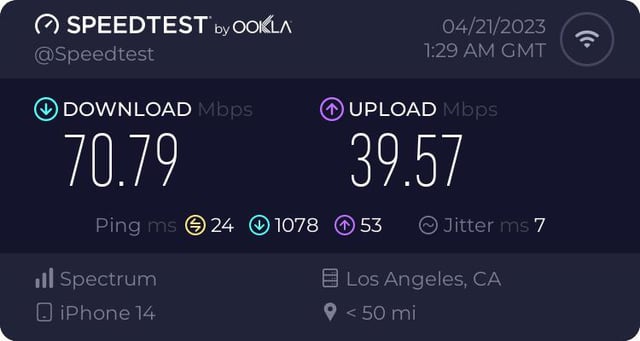
Buffering on Spectrum is primarily caused by slow internet speeds or network congestion. Slow internet speeds can be a result of a poor Wi-Fi connection or an outdated modem.
Network congestion occurs when there is a high volume of data traffic on the network, leading to delays in streaming. Buffering issues on Spectrum can be frustrating for users trying to enjoy streaming content. Understanding the causes of buffering and potential solutions can help improve the overall streaming experience.
We will delve into the common reasons for buffering on Spectrum and explore helpful tips to minimize or eliminate these issues. By addressing these factors, you can enhance your streaming experience and enjoy seamless access to your favorite content on Spectrum.
Spectrum Buffering Causes And Solutions
Buffering on Spectrum can be a frustrating experience, especially when you’re in the middle of streaming your favorite show or movie. Understanding the causes of buffering issues and finding effective solutions can help enhance your streaming experience.
Brief Explanation Of Buffering
Buffering occurs when your device pauses playback to load and store more data, ensuring a smooth streaming experience. It’s commonly experienced during high-definition video streaming, typically caused by insufficient network bandwidth or a slow internet connection.
Identifying Common Reasons For Spectrum Buffering Issues
When it comes to Spectrum buffering, several factors can contribute to this inconvenience. Identifying these common culprits and implementing the right solutions can help improve your streaming quality. Here are the main reasons for Spectrum buffering issues:
- Network Congestion: During peak hours, heavy traffic on the network can result in buffering issues. This can occur when multiple users are simultaneously streaming or downloading large files.
- Slow Internet Connection: If your internet speed is below the recommended Mbps for streaming, it can lead to buffering problems. Insufficient bandwidth can hamper the seamless delivery of data.
- Router Placement: Incorrect placement of your router or interference from electronic devices can weaken the Wi-Fi signal, leading to buffering issues.
- Device Compatibility: Older or incompatible devices may struggle to handle high-definition content, causing buffering problems during streaming.
- Software or App Issues: Outdated streaming apps or software glitches can also contribute to buffering interruptions.
Now that we’ve identified the common causes of Spectrum buffering, let’s explore the solutions to address these issues and enhance your streaming experience.
Internet Connection Troubleshooting
Checking Internet Speed And Stability
Before delving into the troubleshooting process, it’s imperative to assess the speed and stability of your internet connection to identify the root cause of buffering on Spectrum. Slow or intermittent connectivity can lead to disruptive buffering while streaming your favorite shows or movies. To check the internet speed, utilize online speed test tools such as Speedtest by Ookla or Google’s internet speed test. These tools will provide valuable insights into your current download and upload speeds. For stability assessment, keep an eye out for drops or fluctuations in the speed readings.
Resetting Your Modem And Router
If you are experiencing buffering issues, a quick and effective solution is to perform a reset of your modem and router. Unplug the power cables from both your modem and router, wait for about 30 seconds, and then reconnect them. This process will help to clear out any potential glitches or network congestion that might be causing the buffering problems on your Spectrum connection.
Wired Vs Wireless Connections
Consider opting for a wired connection instead of relying solely on wireless connectivity. Wired connections tend to offer more stable and consistent internet connections, minimizing the likelihood of buffering interruptions. If possible, connect your streaming device directly to the modem or router using an Ethernet cable. This method can significantly enhance your streaming experience and reduce buffering on Spectrum.
Network Performance Factors
When it comes to streaming services like Spectrum, network performance plays a crucial role in ensuring a smooth and uninterrupted viewing experience. Several factors can influence network performance, leading to buffering and interruptions during streaming.
Peak Usage Times And Bandwidth Throttling
During peak usage times, such as evenings and weekends, the demand for bandwidth increases significantly. This surge in demand can lead to congestion on the network, causing buffering issues for streaming services like Spectrum. Additionally, ISPs may implement bandwidth throttling during these times to manage network traffic, further impacting streaming performance.
Data Caps And Their Impact On Streaming
Data caps imposed by ISPs can significantly impact streaming performance. When users exceed their data limits, ISPs may throttle their internet speeds, leading to buffering and reduced streaming quality. This restriction can be particularly problematic for heavy streaming users or households with multiple devices accessing the network simultaneously.
Network Congestion And External Interferences
Network congestion, caused by an excessive number of connected devices or inefficient network infrastructure, can lead to buffering and latency issues. External interferences, such as signal interference from neighboring networks or environmental factors like weather conditions, can also impact network performance, affecting streaming quality on Spectrum.
Credit: www.reddit.com
Spectrum Equipment Checks
When it comes to resolving buffering issues on your Spectrum internet, performing regular equipment checks is crucial for ensuring a seamless online experience. By focusing on Spectrum equipment checks, you can identify and address potential issues that may be causing buffering.
Ensuring Modem And Router Health
To prevent buffering on your Spectrum connection, it’s essential to ensure that your modem and router are functioning optimally. This includes checking for any physical damage, loose connections, or overheating that may be disrupting the signal flow. Regularly inspecting these devices can help in identifying and resolving potential issues that could lead to buffering.
Firmware Updates For Spectrum Devices
Keeping your Spectrum devices up to date with the latest firmware is vital for maintaining a stable internet connection. Firmware updates often include bug fixes and performance improvements that can directly impact buffering issues. Regularly check for and install firmware updates for your Spectrum modem and router to ensure optimal performance and minimize buffering.
Signals And Interference Specific To Spectrum Equipment
Signals and interference are common culprits behind buffering on a Spectrum connection. Conducting signal strength tests and identifying potential sources of interference, such as neighboring devices or electronic appliances, can help in pinpointing the root cause of buffering issues specific to Spectrum equipment. By addressing signal and interference issues, you can mitigate buffering and improve overall internet stability.
Enhancing Streaming Quality
Enhancing streaming quality is essential for a smooth and uninterrupted viewing experience. When experiencing buffering on Spectrum, these simple adjustments can help optimize your streaming quality.
Adjusting Video Quality Settings
One of the most effective ways to enhance streaming quality is by adjusting the video quality settings. Lowering the video resolution can significantly reduce buffering, especially during periods of high internet traffic. By setting the video quality to a lower resolution, you can ensure a more stable streaming experience.
Closing Background Apps And Devices
Background apps and devices can consume bandwidth and cause buffering issues during streaming. Closing unnecessary background apps and disconnecting unused devices from the network can free up bandwidth for a smoother streaming experience.
Using Spectrum’s Troubleshooting Tools
Spectrum provides a range of troubleshooting tools to help diagnose and resolve streaming issues. Utilizing tools such as the Spectrum Speed Test can identify any potential network or connectivity issues. Additionally, the Spectrum My Spectrum app offers real-time diagnostic tools to pinpoint any potential streaming quality hurdles.
Advanced Troubleshooting Tips
Experiencing buffering on Spectrum can be frustrating, but there are advanced troubleshooting tips that can help resolve the issue. By understanding the causes of buffering on Spectrum and implementing preventative measures, you can ensure sustained performance of your internet connection.
Spectrum’s Support Channels For Unresolved Issues
If you’ve tried troubleshooting and are still experiencing buffering on Spectrum, you can reach out to their support channels for assistance. You can contact Spectrum customer support via phone, online chat, or by visiting a local Spectrum store. Their knowledgeable experts can provide personalized assistance to help resolve your buffering issues.
When To Ask For A Technician Visit
If you’ve exhausted all troubleshooting options and are still facing buffering problems, it may be time to request a technician visit. A Spectrum technician can perform advanced diagnostics and address any underlying issues with your internet connection, helping to resolve buffering and ensure a smooth streaming experience.
Preventative Measures For Sustained Performance
To prevent buffering issues from recurring, there are several preventative measures you can take. Ensure that your modem and router are up-to-date and in good working condition. Additionally, minimize network congestion by limiting the number of devices connected to your network and consider upgrading to a higher internet speed tier if necessary.
Frequently Asked Questions On What Causes Buffering On Spectrum
What Is Buffering And Why Does It Happen?
Buffering is the temporary storage of data in a device before it’s processed and played. It can occur due to slow internet speed, network congestion, or outdated equipment. Upgrading your internet plan or using an ethernet connection can help reduce buffering.
How Does Spectrum’s Network Impact Buffering?
Spectrum’s network can affect buffering due to various factors such as network traffic, signal interference, and infrastructure quality. Contacting Spectrum’s customer support or utilizing their troubleshooting tools can help identify and resolve network-related buffering issues.
What Steps Can I Take To Reduce Buffering On Spectrum?
To minimize buffering on Spectrum, try optimizing your Wi-Fi router placement, using a wired connection, disabling background applications, and ensuring your devices are updated. Additionally, consider subscribing to a higher internet speed package for smoother streaming and browsing experiences.
Conclusion
Understanding the reasons behind buffering issues on Spectrum is crucial for improving your online streaming experience. By identifying potential culprits such as network congestion, outdated devices, or signal interference, you can take proactive steps to address these issues and enjoy uninterrupted streaming.
With the right troubleshooting techniques, you can optimize your Spectrum connection for a seamless viewing experience.
